
Teams collect sensor data for years and then run into the same wall when they want to do something smart with it. The data lives in one place, the machine learning tools live somewhere else, and connecting them turns into a project of its own: export pipelines, a separate compute environment, credentials to manage, and a sync job that breaks quietly at 2 a.m.
The wall is not the model. Training a forecast or a classifier is well-trodden ground. The wall is operations: getting live device data into the model, getting predictions back to where operators and dashboards can use them, and keeping that loop running without a standing data platform. TagoIO Analysis exists to remove that wall by running your code next to your data. Here is how to use it for machine learning.
What Analysis actually is
An Analysis is a script that runs on a trigger: a schedule, incoming data, a button on a dashboard, or an API call. You write it in Node.js or Python, and it can read from device buckets, call external services, and write results back as variables. Scripts run on TagoIO servers or on your own machine if you prefer to keep heavy compute in-house.
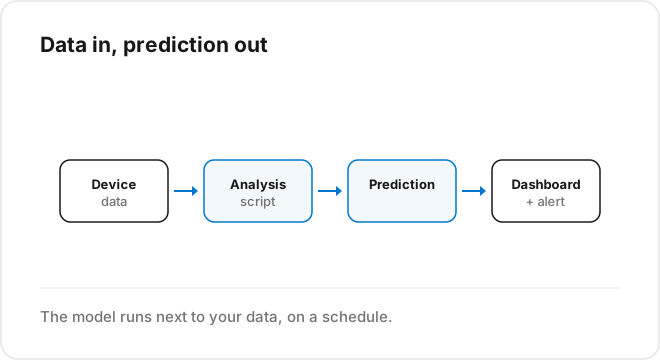
For machine learning, that means one script can pull a device’s history, run a model, and write a prediction back onto the same device, where a dashboard widget or an alert rule picks it up. No export, no second database, no glue service.
Train where it makes sense, serve where the data is
A useful split: heavy training offline, lightweight serving in Analysis.
Training a model, especially anything with many parameters, is a batch job that wants a lot of data and CPU or GPU time. Do that where it is cheap and unhurried. Fit the model, evaluate it honestly, and save the trained artifact.
Serving is different. Serving is “given the latest readings, produce a prediction,” and it needs to happen close to the data, on a schedule or on each new data point. That is what Analysis is good at. A Python Analysis can load a saved model, read the last window of device data, predict, and write the result back in well under the time budget of a monitoring loop.
For simpler models, a linear regression, a small gradient-boosted tree, a seasonal forecast, you can even fit inside the Analysis on a schedule, because the training cost is low. The heavier the model, the more you want training out of the serving path.
A concrete loop
A predictive workflow on TagoIO usually looks like this. A scheduled Analysis reads the recent history of a device or a group, selected by tags. It builds the feature window the model expects. It runs the model, whether that is a fitted Prophet object, a scikit-learn regressor, or a neural network loaded from a saved file. It writes the prediction back as a new variable, plus a confidence or error value. A dashboard plots prediction against actuals, and an alert fires when the prediction crosses a threshold before the real value does.
Because the prediction is just another variable, everything else on the platform treats it like real sensor data. No special case.
Keep the model honest
A model shipped and forgotten degrades. Conditions drift, a sensor is replaced, a process changes, and the predictions quietly get worse while the dashboard still looks confident. Build a second scheduled Analysis that scores recent predictions against what actually happened and records the error over time. When the error climbs past your tolerance, trigger a retrain or raise an alert to a human.
This monitoring script is small and boring, and it is the difference between a model people trust and one they learn to ignore. Skipping it is the most common reason machine learning on IoT data fails after a good demo.
Where to start
Pick one prediction that would change one decision, and build the serving loop first with the simplest model that could work, even a trend line. Get the plumbing right: data in, prediction out, plotted next to actuals, scored on a schedule. Once that loop is live and trusted, upgrading the model is a script edit, not a new project.
Running the model next to the data is the whole point. See how TagoIO Analytics produces forecasts against your live environment.
There is also a no-code path: TagoIO Analytics runs the machine learning for you. Sign in at sight.tago.io/login with your TagoIO account and train a model on your data in minutes to get forecasts and anomaly detection without a data science team.