
The first alert every IoT project builds is a threshold: tell me when the temperature goes above 8 degrees, when the tank drops below 10 percent, when the pressure crosses a limit. It is the right place to start, and it works. When the value crosses the line, someone gets a message.
The limitation is baked into the design. A threshold alert fires when the problem has already started. By the time the freezer reads 8 degrees, the product is already warming. By the time the tank hits 10 percent, you have hours, maybe, to arrange a refill that needs a day of notice. Reactive alerts tell you about a problem at the worst possible moment: once it is real. Forecast-based alerts move that message earlier, to while there is still time to prevent it.
What a predictive alert actually is
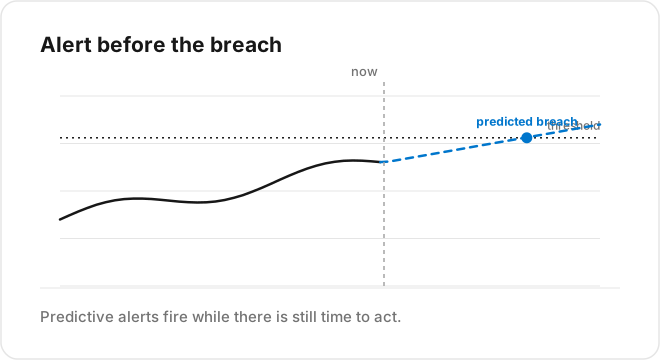
A predictive alert does not watch the current value. It watches the forecast of the value. Instead of “temperature is above 8 now,” it fires on “temperature is trending to cross 8 within two hours.” The trigger is the same threshold, applied to the predicted signal rather than the live one.
That one shift changes the character of the alert. It stops being a record of failure and becomes a window to act. The size of that window is the lead time your forecast provides, and it is the entire value of the approach: enough warning to dispatch a technician, order a refill, shift a load, or cool a space before the limit is breached instead of after.
The two ingredients
Building this needs a forecast and an alert rule pointed at it.
The forecast is a scheduled script that reads recent data and writes a predicted value and a horizon back as variables, the same forecasting loop that powers a dashboard projection. On TagoIO that is an Analysis producing, say, a “predicted temperature in 2 hours” variable for each device.
The alert is an ordinary rule, except it targets the predicted variable instead of the raw reading. “Notify when predicted-temperature-2h exceeds 8.” Because the prediction is stored like any other variable, the platform’s normal alerting treats it as a first-class signal. You are reusing the alerting you already have, aimed at the future.
Handle the honest problems
Predictive alerting has two failure modes worth designing for from the start.
False alarms. A forecast is not certain, so a predictive alert can fire for a problem that never arrives. Too many of those and operators mute it, which is worse than no alert. The defenses: only fire when the forecast crosses the threshold with reasonable confidence, and require the predicted breach to persist across a couple of forecast runs rather than a single noisy spike. Tune the balance toward the cost of a miss versus the cost of a false alarm for that specific signal.
Silent model drift. If the underlying forecast quietly degrades, your predictive alerts degrade with it, and nobody notices until a breach arrives with no warning. This is why the forecast has to be scored continuously. When prediction error climbs past tolerance, that itself should raise an alert to a human, because a predictive alerting system with a stale model is worse than a threshold, since people have stopped watching the raw value.
Keep the threshold too
Predictive alerting does not replace the reactive threshold, it layers on top. The forecast alert gives you lead time on the expected path. The plain threshold stays as the backstop for the case the forecast never saw coming, the sudden failure no trend predicted. Run both: predictive for warning, reactive as the safety net.
Building it on TagoIO
The pieces are already on the platform. A scheduled Analysis in Node.js or Python produces the forecast variable. A standard alert rule watches that variable and notifies by email, SMS, webhook, or into your dashboards. A second scoring Analysis guards the model. Nothing here is a special system, it is the forecasting loop plus the alerting you already run, wired together.
Start by taking your most valuable existing threshold alert and adding a predictive twin that watches the forecast of the same signal. Keep the original as the backstop, tune the confidence until operators trust it, and you have turned an after-the-fact notification into time to act. See how TagoIO Analytics runs the forecast behind a predictive alert.
To get the forecast behind a predictive alert without writing one, use TagoIO Analytics. Sign in at sight.tago.io/login with your TagoIO account and train a model on your data in minutes to get forecasts and anomaly detection you can wire an alert to, without a data scientist.