
I do believe that connected products sell better. An OEM that ships a pump, a meter, or a machine can charge more, learn how customers actually use the product, and open a service revenue line that pure hardware never offered. Buyers now expect an app and a dashboard the way they expect a warranty.
The problem is that adding connectivity to hardware that was never designed for it is where OEM roadmaps stall. The engineering team can get one unit online on a bench. Turning that into a product thousands of customers use, under your brand, with support and updates, is a different project, and it is usually bigger than anyone scoped. Here are the paths that work and how to avoid building a platform you did not mean to build.
Retrofit or design it in
Two starting points. Retrofit adds connectivity to hardware already in the field or already in production, usually through an external module or gateway. Designed-in builds connectivity into the next hardware revision with an onboard module.
Retrofit is faster and reaches your installed base. Designed-in is cleaner and cheaper per unit at volume. Most OEMs do both: retrofit to start earning now, designed-in for the next generation.
The connectivity options
- Add a cellular or LoRaWAN module to the product. Best when the product moves or sits far from infrastructure.
- Put a gateway alongside the product that collects from one or several units over a local link and forwards to the cloud. Good for fixed installations and for bridging older serial or Modbus equipment.
- Use the customer’s network through an onboard client when the product already sits on a connected site.
The right path depends on where your product lives and who controls the network around it. Pick per product line, not once for the whole catalog.
The data pipeline
Once data leaves the device, it needs a home: somewhere to land, be stored, be turned into something a customer can read, and trigger alerts. This is the part OEMs underestimate. Building and running that pipeline yourself means standing up cloud infrastructure, securing it, scaling it, and supporting it for the life of the product. That is a platform, and it is not your core business.
The alternative is to send device data to a platform that already does this, and spend your engineering effort on the product instead.
The branded portal without building one
Here is the part customers see. They do not want to log into a tool with your vendor’s name on it. They want your brand, your colors, your domain, and ideally your mobile app.
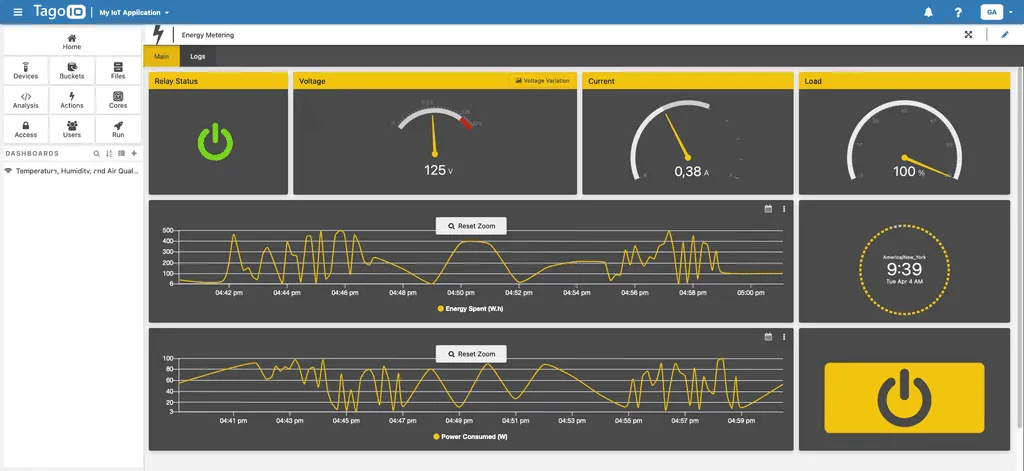
TagoRUN exists for exactly this. You deploy a white-label portal under your own domain, with your logo and your app, and your customers never see TagoIO. You get the connectivity, storage, dashboards, and alerts of a full platform, presented as your product. The hardware is yours; now the software experience is too.
A short example
Novus, an equipment manufacturer, needed to give its OEM customers a complete IoT offering without each of them building a platform. Instead of writing cloud software, they delivered a branded, versatile platform on top of TagoIO, so their customers got dashboards and device management under the Novus brand. The connectivity and software stopped being a roadblock and became part of the product.
Where to start
Pick one product line, choose the connectivity path that fits where it lives, send its data to a platform instead of building one, and put your brand on the front through TagoRUN. Prove the loop on one line, then repeat across the catalog.
Start on the free plan to get one unit reporting, or book a demo to talk through a branded portal for your product line.