
If you are building a solution around Senzemo LoRaWAN sensors, the slowest part of your project just disappeared. TagoIO now ships ready-made connectors for the Senstick line, which means the payloads decode themselves: you pick the sensor model, connect it through your LoRaWAN network, and readings arrive as named variables like temperature, rainfall, or soil moisture instead of hex strings.
Senzemo is a European hardware manufacturer based in Slovenia, focused on rugged, long-life LoRaWAN sensors for environmental monitoring, agriculture, food safety, and waste management. Their Senstick family covers an unusual amount of ground for one product line, and that range is what makes this integration worth writing about: the same platform account can now monitor a vineyard’s microclimate, a restaurant chain’s freezers, and a composting facility’s windrows, all from sensors by one vendor, with zero decoder code.
Which Senzemo sensors work with TagoIO out of the box?
Every sensor below decodes through a public TagoIO connector today. Create the device, choose the connector, and the payload parser is already in place.
| Model | What it measures | Product page |
|---|---|---|
| SMC30 | Indoor microclimate | Indoor Microclimate Sensor |
| SMC30-OUT | Outdoor microclimate | Outdoor Microclimate Sensor |
| SMC40 | Microclimate | Senzemo products |
| SPU30 | Indoor microclimate and air quality | Senzemo products |
| SRM10 | Rain gauge | Rain Meter |
| SSM40 | Soil moisture | Soil Moisture Sensor |
| STB10 | Food simulant with dual temperature | Temperature Buffer Sensor |
| STF40 | Food probe | Food Probe Sensor |
| STO10 | Temperature only | Temperature Only Sensor |
| STP40 | Industrial temperature probe | Temperature Probe Sensor |
| KOU20 | Compost temperature | Compost Temperature Sensor |
The connectors work across the LoRaWAN network servers TagoIO already integrates with, including The Things Network, Actility, Everynet, and others. If your gateways are already forwarding to one of them, the sensor data path is a configuration task, not a development task. The setup flow is documented in Adding Devices with Connectors.
How do you connect a Senzemo sensor to TagoIO?
The path from box to dashboard has three steps. Register the sensor on your LoRaWAN network server and point its uplinks at TagoIO through the matching network integration. Create a device in TagoIO and select the Senzemo connector for your model. Watch the first uplink arrive already decoded.
That last step is the one that used to consume days. Writing and testing a payload parser means reading the vendor’s payload documentation, handling every port and message type, and debugging byte offsets against live traffic. The connector carries all of that, maintained on the platform side. Your project starts at the interesting part: what to do with the data.
What can you build with the outdoor microclimate sensor and rain gauge?
Pair the SMC30-OUT with the SRM10 rain gauge and the SSM40 soil moisture sensor and you have a complete field station for a vineyard, orchard, greenhouse perimeter, or research plot.
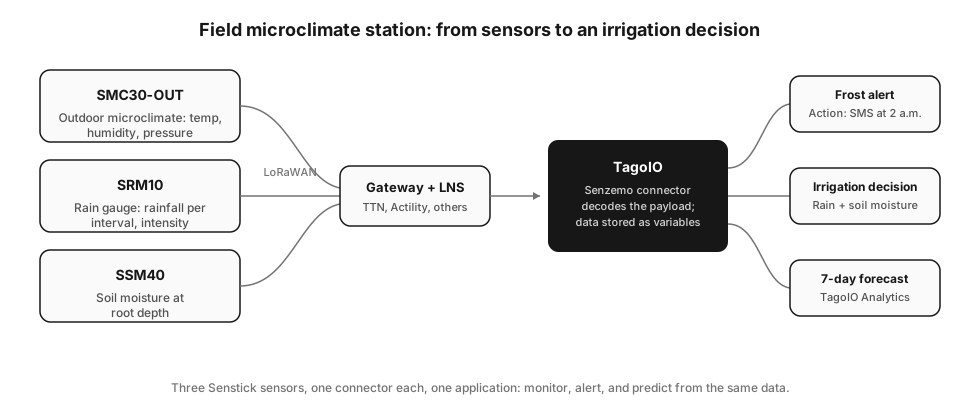
The value is in combining the streams. Rainfall alone does not tell you whether to irrigate; rainfall plus soil moisture at root depth does. Air temperature alone does not protect a crop; a frost alert that fires an SMS at 2 a.m., built with a TagoIO Action on the SMC30-OUT’s readings, gives the grower time to act. Growers also use the humidity and leaf-level temperature data to time fungicide applications, since disease pressure models run on exactly the variables this station produces.
The same trio works beyond agriculture: construction sites tracking pour conditions, municipalities monitoring urban microclimates, and stormwater teams correlating rain intensity with drainage behavior.
How do the food probe and temperature sensors handle HACCP monitoring?
Food safety is where Senzemo’s temperature family stands out, because the four models map to the four places temperature goes wrong.
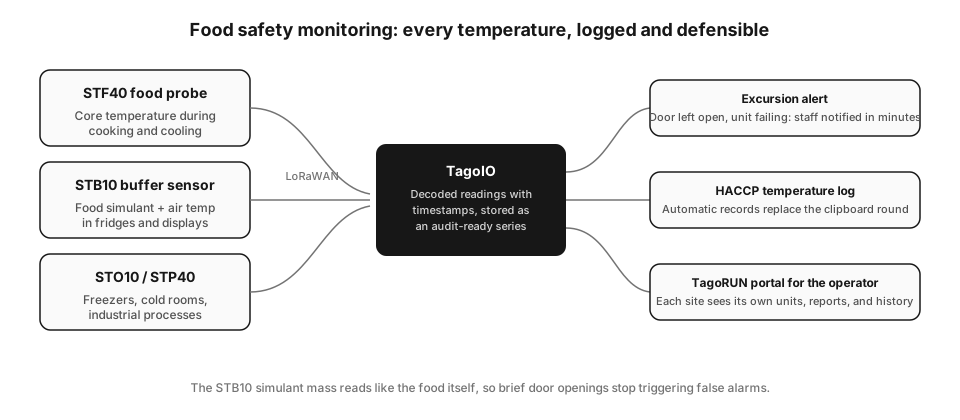
The STF40 food probe measures core temperature during cooking and cooling. The STB10 buffer sensor holds a food simulant mass next to a second air-temperature sensor, so a fridge door opened for thirty seconds does not trigger an alarm, while a genuine excursion that would warm the product does. The STO10 covers freezers and cold rooms where only air temperature matters, and the STP40’s industrial probe reaches into process equipment.
On TagoIO, each reading lands with a timestamp in a time series you can hold up to an auditor. An Action fires when a unit drifts out of range, the HACCP log builds itself instead of living on a clipboard, and a TagoRUN portal gives each restaurant, store, or warehouse its own branded view of its own units. For a multi-site operator, the difference between paper rounds and this setup is measured in labor hours per site per week, plus the incidents caught at 3 a.m. that paper never catches.
What about compost, waste management, and the KOU20?
The KOU20 is a spear-shaped sensor built to sit inside a compost windrow and report core temperature. Composting regulations typically require piles to hold a sanitization temperature for a set period, and facilities prove it today by walking the rows with a handheld thermometer and a logbook.
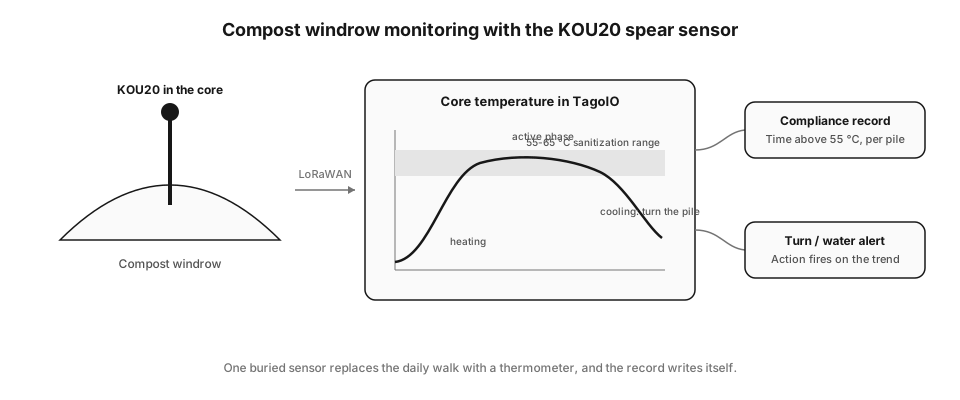
With a KOU20 in each pile, the temperature curve draws itself: the heating phase, the active plateau inside the sanitization band, and the cooling that signals it is time to turn the pile. TagoIO turns that curve into two outputs the facility actually needs: a compliance record of time-above-threshold per pile, and an Action that alerts the crew when a pile cools early or overheats. The operator stops collecting data and starts managing exceptions.
What about indoor air: offices, schools, and archives?
The SMC30 and SPU30 cover the indoor side. Facility teams use them for comfort complaints backed by data instead of opinions, ventilation checks in classrooms and meeting rooms, and humidity control in archives, museums, and server rooms where the tolerance bands are narrow and the cost of drift is high. The same connector-to-dashboard-to-alert pattern applies; only the thresholds change.
How does TagoAI Assistant turn these sensors into an application?
Decoded data is the raw material. The application around it, dashboards, alerts, user access, reports, is where projects historically stall. This is the part TagoAI now does with you.
TagoAI is the AI assistant inside the TagoIO Admin. It reads the context of your account, so you can work at the level of intent: “build a dashboard for my three field stations showing rainfall against soil moisture, with a map of the sensors” produces the dashboard, widgets configured, variables wired. It goes past dashboards. Ask it to create the Action that sends the frost alert, write the Analysis script that computes degree-days from the SMC30-OUT data, or set up the TagoRUN portal your customers log into. You describe the application; the assistant builds the pieces on the platform where they run.
For a systems integrator, this changes the economics of a Senzemo deployment. The connector removes the decoder work, and TagoAI compresses the application work, so the proposal you write can be about the customer’s problem instead of engineering hours. The TagoAI documentation covers the chat modes, and tago.io/ai has the broader picture of AI on the platform.
Can this data predict instead of just report?
Yes, and this is where a Senzemo fleet starts paying for itself twice. TagoIO Analytics trains statistical models on the history your sensors have already accumulated, then returns predictions as regular variables that land on dashboards and trigger Actions like any other reading.
Concrete examples with these sensors: a seasonal forecast on SSM40 soil moisture that predicts when a field crosses its irrigation trigger days in advance; a time-to-threshold estimate on a cold room’s STO10 trend that flags a failing compressor before the excursion alarm ever fires; drift detection on an STB10 that separates a slowly dying fridge from normal daily cycles; rainfall pattern analysis on SRM10 data feeding a drainage capacity model. Training happens on data you already own, through a wizard, without a data science team. If your sensors have been reporting for a few weeks, the history the models need already exists.
Getting started
Order the hardware from Senzemo, and on the TagoIO side you need an account and a LoRaWAN network integration. Create your device with the matching Senstick connector, open TagoAI, and describe the application you want. The steps are in Adding Devices with Connectors.
If you are evaluating the pair for a larger deployment, request a demo and bring your use case: the fastest way to judge the fit is to watch your own sensor’s data become an application in one session.