
Ask any IoT vendor about AI today and you will get a confident yes. AWS points you at Amazon Q and Bedrock. Oracle points you at its OCI IoT Platform. ThingsBoard, Telit, and Losant each have an AI page within two clicks of the homepage. On paper, the question is settled.
But “supports AI assistant integrations” stretches from an assistant that already lives inside the product, reading your actual devices, to a tutorial that begins with provisioning cloud functions and ends three services later. The distance between those two answers is measured in weeks of engineering, and the phrase hiding that distance is “out of the box.”
The honest way to answer the question is to define the phrase first, then hold every platform, ours included, to the same definition.
What “out of the box” should mean
The phrase earns its name when three things are true.
No code. You should not have to write an integration function, a webhook handler, or a parser before the assistant can see device data. Configuration is fine. Programming is not.
No middleware. There is nothing extra to host or babysit. The assistant is either built into the platform, or it connects through an interface the vendor ships, documents, and keeps updated.
Permissioned. The assistant operates inside your existing access model. It starts with the least access that makes it useful, asks before changing anything, and leaves a trail you can audit. An assistant with silent write access to production devices is not a feature. It is an incident report waiting for a timestamp.
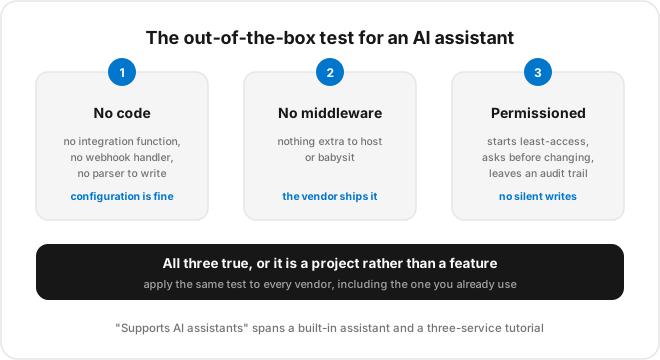
Hold that test up to the market and the picture sharpens quickly.
Three categories of “AI assistant integration”
Almost every claim you will read falls into one of three buckets. They are not equally capable, but each one is the right answer for some teams.
1. Native MCP server
The Model Context Protocol (MCP) is an open standard for connecting AI assistants to external tools and data. When a platform ships its own MCP server, any MCP-compatible assistant can connect to your account and work with your data over that standard. No custom integration project required.
Setup is configuration rather than programming, and access follows the credentials you supply, so this category passes the test. Oracle shipped an MCP server for its OCI IoT Platform, and ThingsBoard maintains one exposing devices, telemetry, and administration. TagoIO sits here too. If one of these platforms is on your shortlist, the MCP server is the feature to evaluate, not the AI marketing page.
The trade-off is that you are committing to the open standard the platform supports, and you should confirm what the server is actually allowed to read and do on your behalf.
2. Open REST API you wire yourself
Plenty of platforms expose a documented REST API and nothing AI-specific on top of it. AWS has the deepest AI toolbox in the industry: Bedrock agents can reach IoT data, Amazon Q can reason over your cloud resources, and AWS IoT SiteWise includes an assistant for industrial data. What AWS does not ship is a pre-connected path from a general assistant to your device fleet. You assemble that path yourself: IAM roles, agent definitions, data sources, and the glue between them. A self-hosted ThingsBoard instance without its MCP server lands in the same place.
This works, and for an enterprise with cloud engineers on staff the results can be excellent. You decide the scope, the auth, and the behavior. It still fails the no-code test, precisely because it is a project. Someone has to write the wrapper, maintain it as the API changes, and own the security of the credentials it holds. For a team with the right people, that ownership is a feature, not a burden.
3. AI that is not a conversational assistant
The third category gets the most marketing and the least scrutiny, and it splits two ways.
A built-in chatbot lives inside the platform UI. It can answer questions, summarize a dashboard, sometimes draft a query, all from within that one screen. For non-technical users this can be genuinely useful. The limit is structural: the assistant cannot be reached by your external tools.
The other shape is AI invested somewhere else entirely. Telit’s deviceWISE AI line concentrates on edge intelligence and machine vision, which solves a real problem but is not a conversational assistant over your account. Losant’s route runs through its workflow engine, where you can wire calls to AI services into flows you design. That is flexible, and it is fair to call it AI support. It is also an integration you build.
None of this is a knock on those platforms. It is a reminder that “AI” on a feature list can mean a conversational assistant, edge inference, or workflow plumbing, and the label alone will not tell you which one you are buying.
How the approaches compare
| Native MCP server | Open REST API | Built-in chatbot or edge AI | |
|---|---|---|---|
| External assistant access | Yes, over an open standard | Yes, after you build it | No |
| Build effort | None for the connection | Custom glue or your own wrapper | None |
| Who scopes credentials | The platform, by design | You | Not applicable |
| Best for | Teams wanting external AI access now | Engineering teams wanting full control | Users inside the UI, or edge inference |
| Main risk | Confirm what the server can read and do | Maintenance and credential ownership fall on you | Cannot leave the dashboard |
| Example | TagoIO, Oracle OCI, ThingsBoard | AWS IoT Core, self-hosted stacks | Telit deviceWISE AI, Losant workflows |
None of these is a trap. A built-in chatbot is fine if your users live in the dashboard. An API you wire yourself is fine if you have engineers and want control. A native MCP server is the shortest path to external, standards-based access. The mistake is buying one while believing you bought another.
TagoIO route one: TagoAI, already inside the Admin
TagoIO ships two routes, built for two different situations.
The first is TagoAI, an assistant built into the TagoIO Admin behind the star icon in the sidebar. It is context-aware: open it from an Analysis or Dashboard page and it already knows what it is looking at. It answers architecture questions grounded in the official documentation, inspects and edits Devices, Dashboards, Actions, and Analysis scripts, generates Analysis code matched to your real devices and data formats, debugs scripts that misbehave, and runs data analysis across your fleet. There is nothing to install and nothing to host, which is what built in is supposed to mean.
The permission model is the part worth reading twice. TagoAI starts every session read-only. You raise its permission per session when you want changes made, it never modifies anything silently, it cannot exceed your own account permissions, and every action it takes is recorded in the Audit Log. That is the third test, passed by design rather than by policy document.
Privacy gets the same treatment. The default AI providers operate under agreements that prevent training on your data. If your compliance team wants more control, you can bring your own provider, with OpenAI, Anthropic, AWS Bedrock, Google Gemini, and OpenRouter all supported, and your keys stored encrypted in TagoIO Secrets. Using your own provider also removes the monthly prompt limit. The feature can be disabled per profile, and it ships off by default in the EU region. The full picture on grounding, permissions, and provider choice goes deeper than this roundup can.
To watch it work on a real account instead of a slide, the recorded webinar AI Meets IoT: A Practical Experience with TagoAI runs through live sessions, including the permission prompts.
TagoIO route two: an MCP server for the assistant you already use
Plenty of teams already live in Claude or another MCP-compatible assistant and have no interest in switching windows. For them, TagoIO publishes an official MCP server, open source on GitHub, that connects an external assistant to your account: devices, data, Analysis scripts, and dashboards, all through a token you scope and control. It works with Claude, ChatGPT, Cursor, and Windsurf, and version 3.0.0 added remote HTTP support, so the server does not have to run on your own machine.
The two routes are complementary, not competing. TagoAI is the assistant inside the Admin, aware of the page you are on. The MCP server brings your TagoIO account to whichever assistant your team already trusts. Either one passes all three tests, and most accounts end up using both.
A checklist to take into any vendor call
Vendor marketing will not draw these distinctions for you, so bring your own questions.
- Can an external assistant reach my data? This is the first cut. If the answer is “only inside our dashboard,” you are in category three. That may be fine, but now you know.
- Over what standard? An open standard like MCP means your existing assistants connect without bespoke work. A proprietary integration ties you to one vendor relationship.
- Does the assistant start read-only, and what raises its permission? Read-only access to telemetry is very different from being able to create scripts, change dashboards, or trigger actions. Get the exact list.
- Where are its actions logged? An audit trail is the difference between a tool you can deploy and one your security team will veto.
- Whose AI model sees your data, under what agreement, and can you bring your own provider? Also ask whether the whole thing can be turned off for a profile that must not have it.
- Does it run remotely or only on my machine? A server that requires a local process is harder to operate for a team.
A vendor with real out-of-the-box support answers those in the documentation. A vendor with a marketing page answers them in a services proposal.
A short decision guide by buyer type
Non-technical team. If your people work inside the platform and rarely leave it, a built-in assistant may cover the need with zero setup. If you also want answers from the assistant you already use elsewhere, look for a native MCP server.
Engineering team. If you have developers and care about controlling exactly what an assistant can do, both the native MCP and the API-you-wire-yourself paths fit. Choose native MCP to save the build; choose the API path when you need control the standard server does not give you, or when your platform offers no MCP server at all.
Integrator or solution builder. If you ship IoT solutions to clients, a native MCP server lets you give each client AI access without writing a new integration per project. An open API still matters as the foundation, but the standard connection is what scales across accounts.
Where that leaves the roundup
Oracle and ThingsBoard support external assistants out of the box through MCP servers. AWS supports nearly anything, provided you build it. Telit and Losant put their AI investment in edge inference and workflow tooling rather than conversational assistants. TagoIO ships both halves: TagoAI built into the Admin, and an open-source MCP server for external assistants, with the same permission discipline on each.
If the generic phrase “AI assistant integration” brought you here, the test to carry away is no code, no middleware, permissioned. Apply it to us too: start free and press the star icon, or book a demo if you would rather see it driven first.
Resources
- What Is the Model Context Protocol (MCP) for IoT, the explainer on the standard behind native integrations
- How to Connect Claude with MCP, a step-by-step how-to
- How to Use an AI Assistant to Query Live IoT Device Data, the walkthrough for TagoAI
- TagoIO MCP documentation
- TagoIO pricing