
AI assistants got good at reasoning long before they got good at knowing anything about your systems. You could ask a model to write an analysis script, but it had no idea how many devices you run, which ones went offline last night, or what your temperature data actually looked like. The intelligence was there. The context was not.
For a while, everyone patched around that the hard way. Each tool built its own custom plugin, its own authentication, its own data format, and the assistant had to learn every one separately. It did not scale, and IoT, with its sprawl of devices, protocols, and data, was one of the worst-fit domains for that approach. You would wire an assistant to one system, it would half-work, and the next system meant starting over.
The Model Context Protocol changes the shape of the problem rather than adding another patch. So it is worth understanding properly: what MCP actually is, why it fits IoT specifically, how a request flows from your question to a grounded answer, what the security model really is, and what becomes possible once your device data is one standard call away from an AI assistant. This is the complete version of that picture.
What MCP actually is
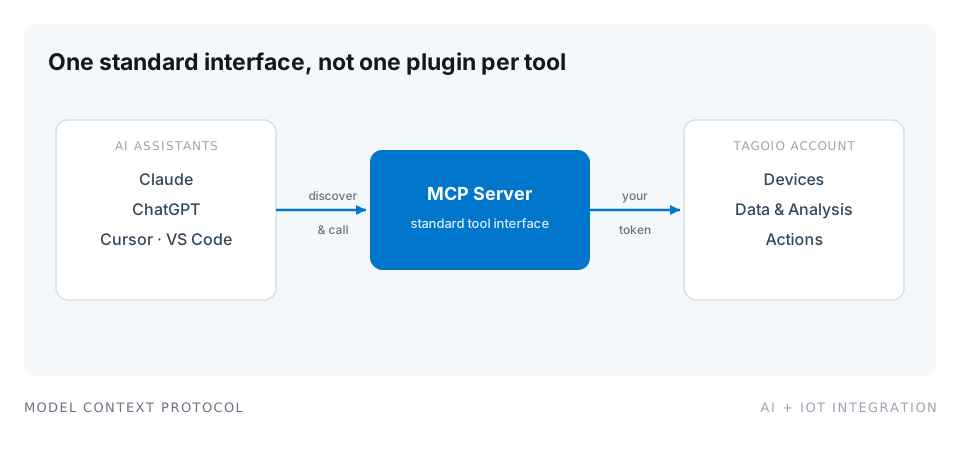
The Model Context Protocol is an open standard that lets AI assistants talk to external tools and data sources through a consistent interface. Instead of every application inventing its own plugin format, MCP gives the assistant a standard way to discover what a server can do and then call it.
The pieces are simple, and worth naming precisely because the rest of this guide builds on them.
An MCP server exposes a set of capabilities, called tools, to any assistant that connects. A tool is a named, described action with typed inputs, for example “list devices” or “get data for this variable over a time range.” The server also describes each tool well enough that the assistant knows when and how to use it.
An MCP client is the AI assistant, or the app hosting it. It connects to the server, asks what tools exist, and calls them when the conversation needs them.
The transport is how the two talk, either locally over standard input and output, or remotely over HTTP. We come back to transports below, because for IoT the choice has real security implications.
The important word in all of this is standard. Because the protocol is shared, the same server works across the Claude apps, ChatGPT, Cursor, Windsurf, and the AI extensions in VS Code, with no per-assistant integration work. You publish one server; every compliant assistant can use it.
Why a standard is the whole point
To see why this matters, count the integrations. Before MCP, connecting three assistants to three tools meant nine bespoke integrations, each with its own auth and data handling, each one breaking whenever either side changed. That is the many-to-many trap, and it is exactly the trap IoT teams kept falling into, because there are always more devices and more tools next quarter.
MCP turns that N times M explosion into N plus M. Each tool publishes one MCP server. Each assistant speaks MCP. The integration surface collapses from a tangle into a hub, and adding a new assistant costs nothing on the tool side.
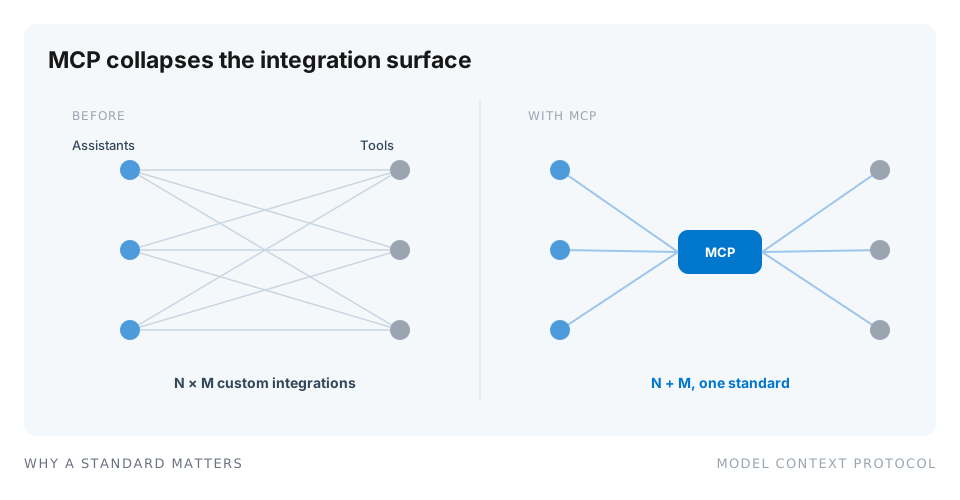
That collapse is not a cosmetic tidy-up. It is what makes AI access to IoT data maintainable instead of a permanent integration project. The moment your platform speaks MCP, every current and future assistant can reach it without you writing another connector.
Why IoT is a natural fit
IoT has two properties that make it almost ideal for MCP, and both come down to context.
First, IoT data is large, structured, and impossible to eyeball. A single deployment can have thousands of devices emitting readings every few seconds. No human scrolls through that. An assistant that can query it directly, filter it, and summarize it turns a data lake you never open into answers you can simply ask for.
Second, IoT work is repetitive and code-heavy in predictable ways. Writing payload parsers, building analysis scripts, tagging devices, and debugging why a sensor stopped reporting are tasks that follow patterns. An assistant with real context about your account, not a generic guess, can produce a correct first draft because it can see your actual devices and variables instead of hallucinating a plausible-looking version.
Put together, MCP lets an assistant move from “knows about IoT in general” to “knows about your IoT deployment specifically.” That is the entire difference between a chatbot and a useful colleague, and it is why the fit is so much better than it first appears.
How a request actually flows
The reason MCP answers can be trusted, when the setup is right, is that every step is grounded in a real call rather than a guess. Here is the lifecycle from question to answer.
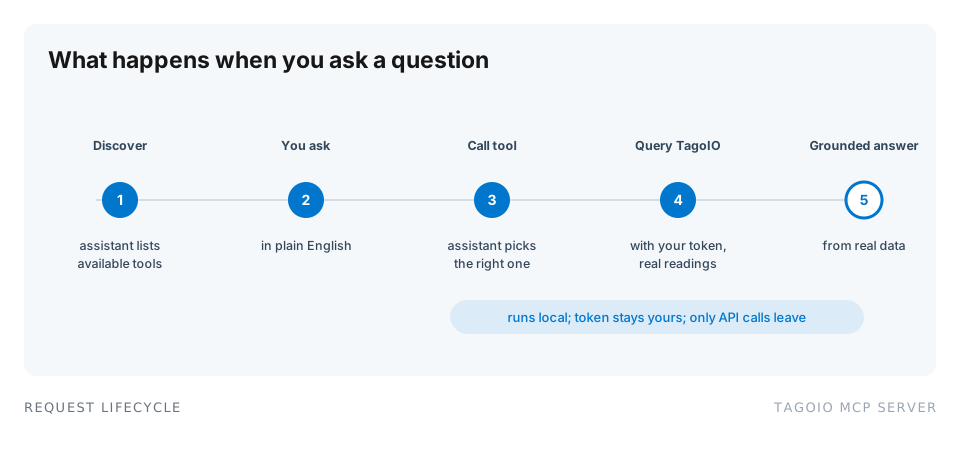
First, on connection, the assistant discovers the tools the server offers and reads their descriptions. Then you ask a question in plain language. The assistant recognizes the question needs data and calls the right tool, filling in the parameters from your request. The MCP server queries TagoIO using the token you configured, pulls the actual readings, and runs any aggregation server-side. Finally, the assistant produces a grounded answer built from that result, and can propose a next step.
The distinction that matters: at step four, real data is fetched and real math is run. The assistant is not recalling numbers from training or doing arithmetic on pasted text, which it is unreliable at. It called a tool, the tool returned facts, and the answer is built on those facts. That is what separates a tool you would put in front of a client from a demo you would not.
What it looks like on TagoIO
TagoIO ships an official MCP server, and it is open source on GitHub. Once connected with a token, an assistant can do real work against your account. The tools fall into a few groups.
Device management. Read device information, configuration, and live data, so the assistant can answer “what is Unit 4 reporting right now” or “which devices are configured for the north site.”
Data analysis. Run sums, averages, and reports over stored data, so aggregation happens against real readings through the platform rather than in the model’s head.
Platform introspection. Retrieve users, Actions, Analysis scripts, and account statistics, so the assistant understands how your account is wired, not just what data it holds.
Code generation. Produce TagoIO Analysis scripts with the correct context, so a generated script references your real variables and tags instead of a generic stub.
Development support. Help debug and reason about tag relationships, which is often where time disappears on a large deployment.
Because the MCP server is just another client of the TagoIO REST API, it inherits the same access model as any integration. That is a design consequence of the platform being API-first, which we cover in the IoT platform API that actually fits custom integrations.
The security model, in plain terms
This is the part teams should read closely, because “let an AI reach our production data” deserves scrutiny.
The TagoIO MCP server runs in a local mode, as a process on your own machine, talking to the assistant over standard input and output. The assistant launches the server, the server talks to TagoIO using your token, and everything stays local except the API calls themselves. Your data is not copied into a third-party system, and the assistant does not get a bulk dump of your account. It gets a controlled, tokened interface to ask specific questions, exactly like any other API client.
That leaves the real control in your hands: the token. Scope it to what the use case needs. If the job is answering questions, a read-only token is enough, and it removes any risk of the assistant changing configuration. If you want the assistant to help build scripts or Actions, grant that deliberately. Treat the MCP token the way you would treat any API credential, because that is what it is. Good token hygiene, least privilege, and rotation still apply.
For teams that need the server reachable beyond one machine, a remote transport over HTTP is possible, at which point normal API-security thinking applies: put it behind auth, scope the token, and log the access. The default local mode is the simplest and safest place to start, and a good default for a single developer.
Worked examples
The value is easier to feel with concrete asks. Each of these is a real prompt against a connected account, and in each case the answer comes from a tool call, not a guess.
“Which freezers went out of range last week, and for how long.” The assistant calls the data tools, pulls the readings for devices tagged as freezers, computes the breaches, and answers with units and durations, then offers to tighten the Action that alerts on it. We walk through this querying pattern in how to query your IoT data in natural language.
“Write an analysis script that flags any tank below 20 percent and tags the device.” Because the assistant can see your real variables and tag structure, the generated script is close to runnable rather than a template you have to rewrite.
“Unit 12 threw an alert at 3 a.m., what else was happening around then.” The assistant pulls adjacent variables and the surrounding timeline, giving you context for the investigation instead of a single isolated reading. That investigative use is the sweet spot for AI on top of statistical detection, which we cover in detecting anomalies in IoT sensor data.
What changes for the people doing the work
The reason this is more than a novelty is what it does to the day-to-day.
A developer stops writing analysis scripts from a blank file and starts from a working draft grounded in the real variables. A support engineer stops exporting CSVs to answer “what happened to Unit 4 last week” and just asks. An operations manager who never learned the query language gets answers without waiting for a report. And a system integrator can offer clients a natural-language window into their own data, a service most integrators cannot yet deliver, which is one of the clearest ways to differentiate a managed service right now.
None of this replaces the platform. The dashboards, the Actions, and the device management still run the operation, as they always have; the tag-driven model behind them is described in how TagoIO works. MCP adds a conversational layer on top, so the questions you could always answer with enough clicking, you can now answer by asking.
What exists today
MCP for IoT is not a proposal, and it is not a single-vendor idea either.
TagoIO ships an official MCP server, open source on GitHub, that gives a connected assistant access to your devices, data, Analysis scripts, and dashboards, always inside the token scope you choose.
ThingsBoard maintains an MCP server exposing devices, telemetry, and administration to compatible assistants. Oracle added one to its OCI IoT Platform, and a vendor of that size adopting the same open protocol as independent and open-source platforms tells you where the standard is heading. For the wider field, including which platforms put their AI investment somewhere other than a conversational assistant, see which IoT platforms support AI assistant integrations out of the box.
Researchers arrived early too. arXiv already carries papers analyzing MCP for embedded and IoT systems, along with security reviews of the protocol itself. Academic attention at this stage usually marks a standard that will still matter in five years.
TagoIO also ships a second, zero-setup route worth knowing about: TagoAI, an assistant built directly into the Admin, context-aware from the page you have open, starting read-only with every action recorded in the Audit Log. MCP connects the assistant you already use to your account; TagoAI is the one waiting behind the star icon when you sign in. There is a step-by-step walkthrough for that route, and the recorded webinar AI Meets IoT: A Practical Experience with TagoAI shows both ideas working against a live account.
How to try it in ten minutes
The fastest way to understand MCP is to feel one grounded answer land.
- Create a TagoIO account at admin.tago.io, or use the one you have.
- Generate a token scoped to read-only.
- Install the MCP server from GitHub, following the setup guide, and register it with Claude, ChatGPT, Cursor, or a VS Code extension.
- Ask a question you already know the answer to, such as “how many devices do I have, and which ones reported in the last hour.”
- Check the numbers against the Admin.
- Widen the token scope only when you have a task that needs it, such as generating an Analysis script.
If the answer in step five matches the Admin, you have seen the whole idea: a standard interface, a scoped credential, and an assistant answering from your real data in natural language. The hands-on companion, connecting Claude and other AI assistants to your IoT platform, walks the configuration step by step.
The short version
MCP is an open standard that lets any compliant AI assistant discover and use your tools through one interface, collapsing a many-to-many integration mess into a single hub. IoT is a strong fit because the data is too big to read and the work is repetitive enough to draft. With the TagoIO MCP server, an assistant can query your real devices and data, run real aggregations, generate correct analysis code, and investigate anomalies, all through a token you scope and control, with everything local except the API calls. And it is shipping today, from TagoIO, ThingsBoard, and Oracle, with researchers close behind. The intelligence was always there. MCP finally gives it the context.
Ready to try it? Grab the server on GitHub, follow the MCP setup guide, or start free on TagoIO and connect your first assistant today. If you want it walked through live, book a demo.